Game objects
Rectangles, borders and text
Declarative rendering: set fillColor, borderRadius, border, textColor and font on a GameObject and the renderer draws it.
- renderer
- fillColor
- border
- text
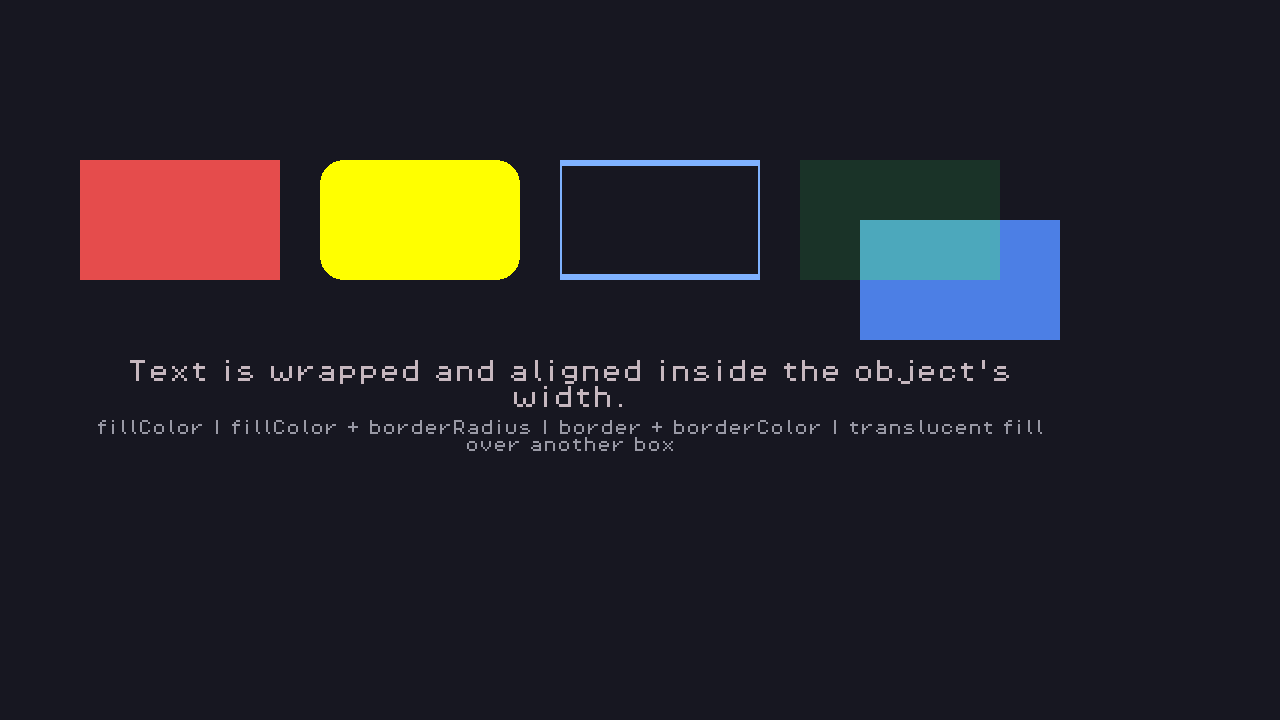
Source
examples/game-objects/shapes-and-text.lua · 64 lines · Open on GitHub
-- title: Rectangles, borders and text
-- description: Declarative rendering: set fillColor, borderRadius, border, textColor and font on a GameObject and the renderer draws it.
-- order: 1
-- tags: renderer, fillColor, border, text
local Scene = require "engine.Scene"
local GameObject = require "engine.GameObject"
local Vector2 = require "engine.Vector2"
local Vector4 = require "engine.Vector4"
local cacheManager = require "engine.cacheManager"

---@class GameObjectsShapes : Scene
local Example = Scene.extend(Scene)

function Example:new()
  Example.super.new(self, "game-objects/shapes-and-text")
  self.backgroundColor = { 0.09, 0.09, 0.13, 1 }
end

function Example:load()
  local fill = self:addGameObject(GameObject("fill", Vector2(80, 160), 200, 120))
  fill.fillColor = Vector4(0.9, 0.3, 0.3, 1)

  local rounded = self:addGameObject(GameObject("rounded", Vector2(320, 160), 200, 120))
  rounded.fillColor = Vector4(1, 1, 0, 1)
  rounded.borderRadius = Vector4(24, 24, 24, 24) -- rx, ry, segments are taken from x, y, z, w

  -- Border is (top, right, bottom, left) like padding and margin, not CSS order.
  local bordered = self:addGameObject(GameObject("bordered", Vector2(560, 160), 200, 120))
  bordered.border = Vector4(6, 2, 6, 2)
  bordered.borderColor = Vector4(0.5, 0.7, 1, 1)

  local translucent = self:addGameObject(GameObject("translucent", Vector2(800, 160), 200, 120))
  translucent.fillColor = Vector4(0.3, 0.9, 0.5, 0.4)

  local overlap = self:addGameObject(GameObject("overlap", Vector2(860, 220), 200, 120))
  overlap.fillColor = Vector4(0.3, 0.5, 0.9, 1)
  overlap.ysortOffset = -200 -- sort before the translucent box so it shows through

  -- Text needs text, textColor and font; width is the wrap/alignment width.
  local label = self:addGameObject(GameObject("label", Vector2(80, 360), 980, 40))
  label.text = "Text is wrapped and aligned inside the object's width."
  label.textColor = Vector4(0.78, 0.72, 0.75, 1)
  label.font = cacheManager.getFont("header")
  label.textAlign = "center"

  local caption = self:addGameObject(GameObject("caption", Vector2(80, 420), 980, 40))
  caption.text = "fillColor | fillColor + borderRadius | border + borderColor | translucent fill over another box"
  caption.textColor = Vector4(0.6, 0.6, 0.65, 1)
  caption.font = cacheManager.getFont("body")
  caption.textAlign = "center"
end

function Example.check(scene, ctx)
  if ctx.done then
    local names = { "fill", "rounded", "bordered", "translucent", "overlap", "label", "caption" }
    for _, name in ipairs(names) do
      assert(scene:getGameObject(name), "missing object " .. name)
    end
    assert(scene:getGameObject("rounded").borderRadius.x == 24, "borderRadius kept")
    assert(scene:getGameObject("bordered").fillColor == nil, "border-only object has no fill")
  end
end

return Example