Input
Menu navigation
A FocusGroup moves focus between Buttons with the ui_* actions and activates the focused one.
- FocusGroup
- Button
- ui_accept
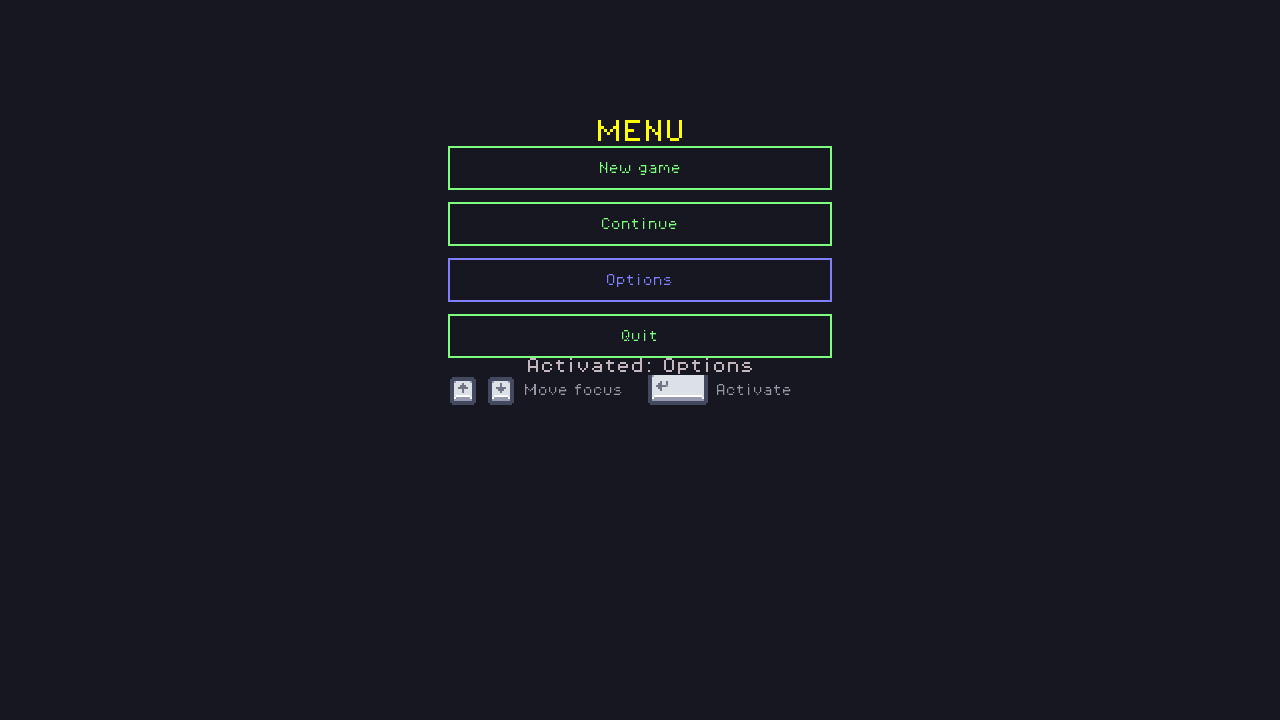
Source
examples/input/focus-group.lua · 83 lines · Open on GitHub
-- title: Menu navigation
-- description: A FocusGroup moves focus between Buttons with the ui_* actions and activates the focused one.
-- order: 5
-- tags: FocusGroup, Button, ui_accept
local Scene = require "engine.Scene"
local Vector4 = require "engine.Vector4"
local UICanvas = require "engine.ui.UICanvas"
local UIBox = require "engine.ui.UIBox"
local UIText = require "engine.ui.UIText"
local Button = require "engine.ui.Button"
local FocusGroup = require "engine.ui.FocusGroup"
local InputPrompt = require "engine.ui.InputPrompt"

local LABELS = { "New game", "Continue", "Options", "Quit" }

---@class InputFocusGroup : Scene
local Example = Scene.extend(Scene)

function Example:new()
  Example.super.new(self, "input/focus-group")
  self.backgroundColor = { 0.09, 0.09, 0.13, 1 }
  self.focus = FocusGroup() -- one column; { columns = 2 } or { horizontal = true } for grids and rows
  self.activated = nil
end

function Example:load()
  self.focus:clear()
  self.status = UIText("focusStatus", "Nothing activated yet", { font = "body", textAlign = "center",
    color = Vector4(0.78, 0.72, 0.75, 1) })
  self.buttons = {}
  for i, label in ipairs(LABELS) do
    local button = Button("menu" .. i, label, { height = 44 })
    local scene = self
    function button:onClick()
      scene.activated = label
      scene.status.text = "Activated: " .. label
    end

    self.buttons[i] = button
    self.focus:add(button) -- hover also moves focus here (Button calls focusGroup:setFocus)
  end

  self:addGameObject(UICanvas("focusUI", {
    UIBox("focusSpacer", {}, { height = 120 }),
    UIText("focusTitle", "MENU", { font = "header", textAlign = "center", color = Vector4(1, 1, 0, 1) }),
    UIBox("focusRow", {
      UIBox("focusColumn", self.buttons, { width = "30%", gap = 12 }),
    }, { display = "flex", flexDirection = "row", justifyContent = "center", margin = Vector4(32, 0, 0, 0) }),
    UIBox("focusStatusRow", { self.status }, { margin = Vector4(56, 0, 0, 0) }),
    UIBox("focusHints", {
      UIBox("focusHintBox", {
        InputPrompt("focusHintMove", { "ui_up", "ui_down" }, "Move focus", { color = Vector4(0.6, 0.6, 0.65, 1) }),
        InputPrompt("focusHintAccept", "ui_accept", "Activate", { color = Vector4(0.6, 0.6, 0.65, 1) }),
      }, { width = "30%", display = "flex", flexDirection = "row", gap = 12, height = 32 }),
    }, { display = "flex", flexDirection = "row", justifyContent = "center", margin = Vector4(24, 0, 0, 0) }),
  }, {}))
end

function Example:start()
  Example.super.start(self)
  if not self.focus:getFocused() then self.focus:setFocus(1) end
end

function Example:update(dt)
  self.focus:update(dt) -- polls ui_up/ui_down/ui_accept, with key repeat
end

Example.script = {
  { at = 20, tap = "ui_down" },
  { at = 40, tap = "ui_down" },
  { at = 60, tap = "ui_accept" },
}

function Example.check(scene, ctx)
  if ctx.frame == 30 then
    assert(scene.focus:getFocused() == scene.buttons[2], "focus moved to the second button")
  elseif ctx.done then
    assert(scene.focus:getFocused() == scene.buttons[3], "focus on the third button")
    assert(scene.activated == LABELS[3], "third button activated, got " .. tostring(scene.activated))
  end
end

return Example