UI
Buttons
Button handles hover, click and keyboard activation; define onClick on the instance before adding it.
- Button
- onClick
- hover
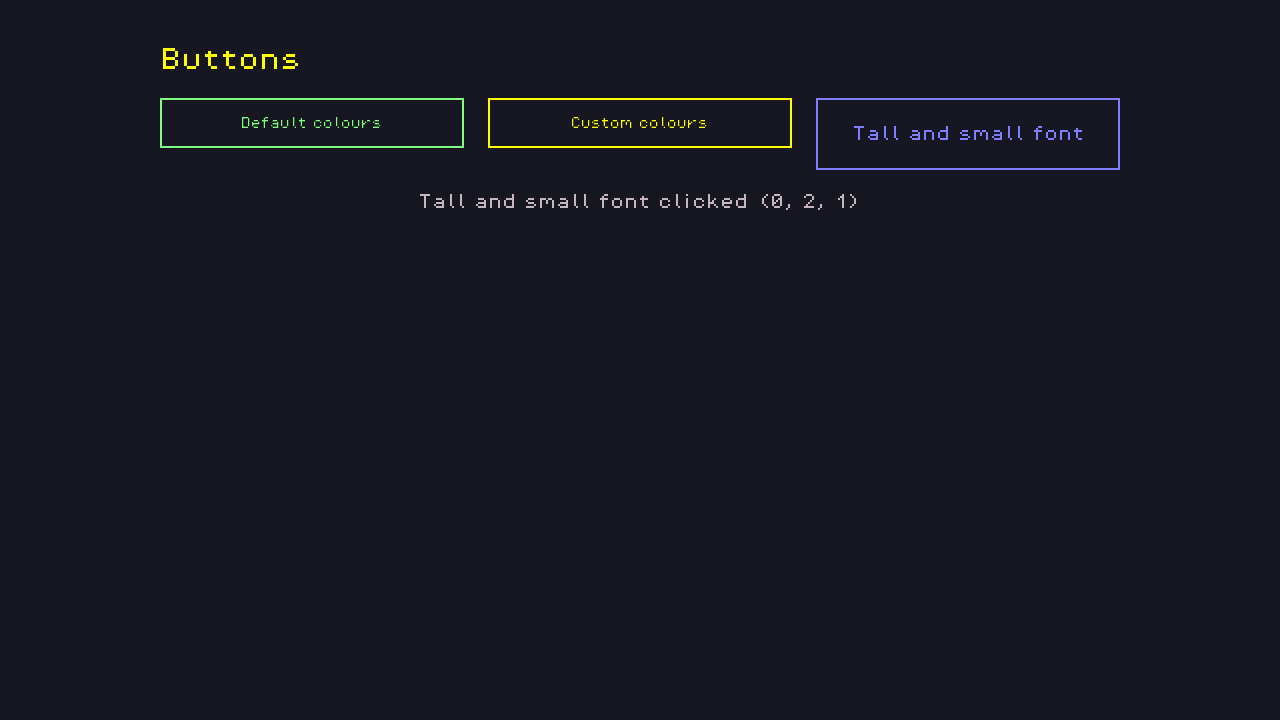
Source
examples/ui/buttons.lua · 79 lines · Open on GitHub
-- title: Buttons
-- description: Button handles hover, click and keyboard activation; define onClick on the instance before adding it.
-- order: 4
-- tags: Button, onClick, hover
local Scene = require "engine.Scene"
local Vector4 = require "engine.Vector4"
local UICanvas = require "engine.ui.UICanvas"
local UIBox = require "engine.ui.UIBox"
local UIText = require "engine.ui.UIText"
local Button = require "engine.ui.Button"

---@class UIButtons : Scene
local Example = Scene.extend(Scene)

function Example:new()
  Example.super.new(self, "ui/buttons")
  self.backgroundColor = { 0.09, 0.09, 0.13, 1 }
  self.clicks = { 0, 0, 0 }
end

function Example:load()
  self.status = UIText("buttonStatus", "Click a button", { color = Vector4(0.78, 0.72, 0.75, 1), textAlign = "center" })
  self.buttons = {}
  local labels = { "Default colours", "Custom colours", "Tall and small font" }
  local styles = {
    {},
    { color = Vector4(1, 1, 0, 1), highlightColor = Vector4(1, 0.5, 0.5, 1) },
    { height = 72, font = "body" },
  }
  for i = 1, 3 do
    local button = Button("button" .. i, labels[i], styles[i])
    local scene = self
    function button:onClick()
      scene.clicks[i] = scene.clicks[i] + 1
      scene.status.text = string.format("%s clicked (%d, %d, %d)", labels[i], scene.clicks[1], scene.clicks[2], scene.clicks[3])
    end

    self.buttons[i] = button
  end

  self:addGameObject(UICanvas("buttonsUI", {
    UIBox("buttonsPanel", {
      UIText("buttonsTitle", "Buttons", { font = "header", color = Vector4(1, 1, 0, 1) }),
      UIBox("buttonsRow", self.buttons, { display = "flex", flexDirection = "row", gap = 24, margin = Vector4(24, 0, 24, 0) }),
      self.status,
    }, {}),
  }, { padding = Vector4(48, 160, 48, 160) }))
end

-- Clicks go through the mouse pipeline, so the test moves and clicks on the button's own rect.
local function clickButton(index)
  return function(scene)
    local pos = scene.buttons[index]:getPos()
    local x, y = pos.x + 20, pos.y + 20
    love.mousemoved(x, y, 0, 0, false)
    love.mousepressed(x, y, 1, false, 1)
    love.mousereleased(x, y, 1, false, 1)
  end
end

Example.script = {
  { at = 20, call = function(scene) local p = scene.buttons[2]:getPos(); love.mousemoved(p.x + 20, p.y + 20, 0, 0, false) end },
  { at = 40, call = clickButton(2) },
  { at = 60, call = clickButton(2) },
  { at = 80, call = clickButton(3) },
}

function Example.check(scene, ctx)
  if ctx.frame == 30 then
    assert(scene.buttons[2].isMouseOver, "hovering the second button")
    assert(scene.buttons[2].borderColor == scene.buttons[2].highlightColor, "hover highlights the border")
  elseif ctx.done then
    assert(scene.clicks[1] == 0 and scene.clicks[2] == 2 and scene.clicks[3] == 1,
      string.format("clicks %d %d %d", scene.clicks[1], scene.clicks[2], scene.clicks[3]))
    assert(not scene.buttons[2].isMouseOver and scene.buttons[3].isMouseOver, "mouse ended on the third button")
  end
end

return Example