UI
A HUD
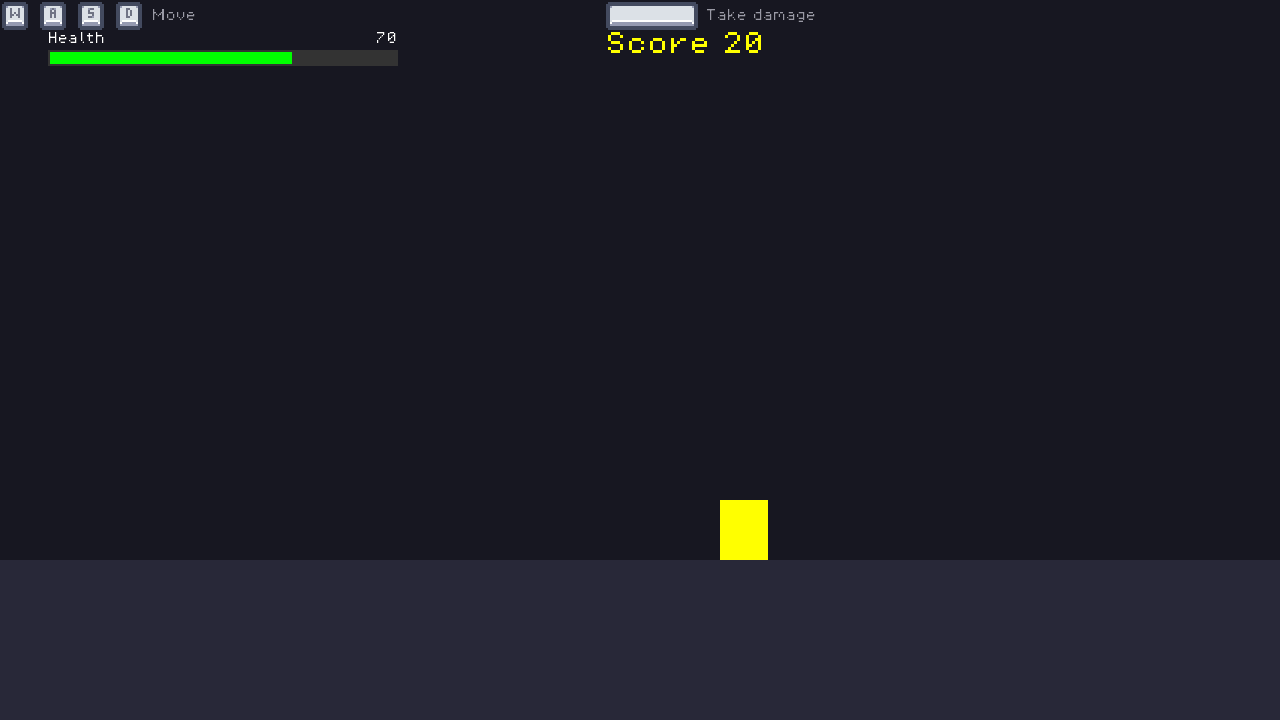
World objects and a screen-space HUD together: health bar, score and a hint, all bound to game state in update().
- ui layer
- UIBar
- UIText
- HUD
Source
examples/ui/hud.lua · 89 lines · Open on GitHub
-- title: A HUD
-- description: World objects and a screen-space HUD together: health bar, score and a hint, all bound to game state in update().
-- order: 6
-- tags: ui layer, UIBar, UIText, HUD
local Scene = require "engine.Scene"
local GameObject = require "engine.GameObject"
local Vector2 = require "engine.Vector2"
local Vector4 = require "engine.Vector4"
local UICanvas = require "engine.ui.UICanvas"
local UIBox = require "engine.ui.UIBox"
local UIText = require "engine.ui.UIText"
local UIBar = require "engine.ui.UIBar"
local InputPrompt = require "engine.ui.InputPrompt"
local inputMap = require "engine.input.inputMap"

local SPEED = 240

---@class UIHud : Scene
local Example = Scene.extend(Scene)

function Example:new()
  Example.super.new(self, "ui/hud")
  self.backgroundColor = { 0.09, 0.09, 0.13, 1 }
  self.score = 0
  self.health = 100
  self.elapsed = 0
end

function Example:load()
  -- World: a floor and the player on the entities layer.
  for i = 0, 9 do
    local tile = GameObject("floor" .. i, Vector2(i * 128, 560), 128, 160)
    tile.layer = "ground"
    tile.fillColor = Vector4(0.16, 0.16, 0.22, 1)
    self:addGameObject(tile)
  end
  self.player = self:addGameObject(GameObject("player", Vector2(600, 500), 48, 60))
  self.player.fillColor = Vector4(1, 1, 0, 1)

  -- Screen: a UICanvas on the ui layer; it is drawn after the camera is unset.
  self.healthBar = UIBar("hudHealth", "Health", "100", 100, 12)
  self.scoreText = UIText("hudScore", "Score 0", { font = "header", color = Vector4(1, 1, 0, 1), textAlign = "right" })
  self:addGameObject(UICanvas("hudUI", {
    UIBox("hudTop", {
      UIBox("hudLeft", { self.healthBar }, { width = "30%" }),
      UIBox("hudRight", { self.scoreText }, { width = "30%" }),
    }, { display = "flex", flexDirection = "row", gap = 16 }),
    UIBox("hudBottom", {
      InputPrompt("hudMove", { "move_up", "move_left", "move_down", "move_right" }, "Move", { color = Vector4(0.6, 0.6, 0.65, 1) }),
      InputPrompt("hudHit", "action", "Take damage", { color = Vector4(0.6, 0.6, 0.65, 1) }),
    }, { display = "flex", flexDirection = "row", gap = 24, height = 32, position = "absolute", left = 0, top = 620 }),
  }, { padding = Vector4(32, 48, 32, 48) }))
end

function Example:onActionPressed(name)
  if name == "action" then
    self.health = math.max(0, self.health - 10)
  end
end

function Example:update(dt)
  self.elapsed = self.elapsed + dt
  local dx = inputMap.axis("move_left", "move_right")
  local pos = self.player:getPos()
  pos.x = math.max(0, math.min(1280 - 48, pos.x + dx * SPEED * dt))
  self.player:setPos(pos)
  -- Score ticks up 10 points a second; the HUD reads game state every frame.
  self.score = math.floor(self.elapsed * 10 + 1e-6)
  self.scoreText.text = "Score " .. self.score
  self.healthBar:updateValue(self.health, tostring(self.health))
end

Example.script = {
  { at = 2, press = "move_right" },
  { at = 32, release = "move_right" },
  { at = 40, tap = "action" },
  { at = 50, tap = "action" },
  { at = 60, tap = "action" },
}

function Example.check(scene, ctx)
  if ctx.done then
    assert(scene.scoreText.text == "Score " .. scene.score and scene.score == 20, "score text bound to state")
    assert(scene.health == 70 and scene.healthBar.barFill.percent == 70, "three hits")
    assert(math.abs(scene.player:getPos().x - (600 + 30 * 4)) < 1e-6, "player moved 30 frames")
  end
end

return Example