Lighting
Point lights
A LightManager darkens the scene to an ambient colour and adds coloured point lights on top.
- LightManager
- addLight
- ambient
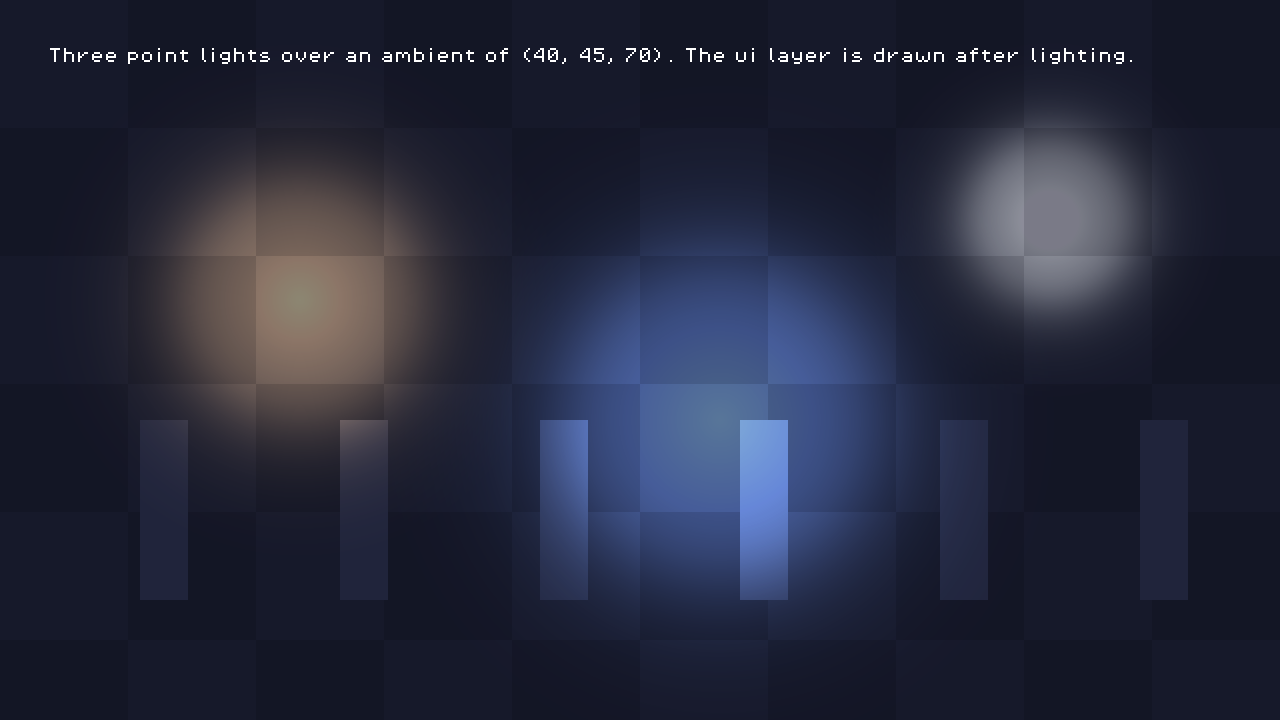
Source
examples/lighting/point-lights.lua · 67 lines · Open on GitHub
-- title: Point lights
-- description: A LightManager darkens the scene to an ambient colour and adds coloured point lights on top.
-- order: 1
-- tags: LightManager, addLight, ambient
local Scene = require "engine.Scene"
local GameObject = require "engine.GameObject"
local Vector2 = require "engine.Vector2"
local Vector4 = require "engine.Vector4"
local cacheManager = require "engine.cacheManager"
local LightManager = require "engine.components.LightManager"

---@class LightingPointLights : Scene
local Example = Scene.extend(Scene)

function Example:new()
  Example.super.new(self, "lighting/point-lights")
  self.backgroundColor = { 0.35, 0.35, 0.42, 1 }
end

function Example:load()
  for row = 0, 5 do
    for col = 0, 9 do
      local tile = GameObject(string.format("tile-%d-%d", col, row), Vector2(col * 128, row * 128), 128, 128)
      tile.layer = "ground"
      local shade = (col + row) % 2 == 0 and 0.55 or 0.48
      tile.fillColor = Vector4(shade, shade, shade + 0.05, 1)
      self:addGameObject(tile)
    end
  end
  for i = 0, 5 do
    local pillar = self:addGameObject(GameObject("pillar" .. i, Vector2(140 + i * 200, 420), 48, 180))
    pillar.fillColor = Vector4(0.8, 0.8, 0.85, 1)
  end

  -- Assigning a LightManager to scene.lightManager is all the scene needs; it is
  -- updated after the objects and drawn over the world layers each frame.
  self.lightManager = LightManager:new(self)
  self.lightManager.world:SetColor(40, 45, 70, 255) -- ambient: how dark unlit areas are

  -- addLight(x, y, radius, { r, g, b } in 0..255, intensity, id)
  self.lightManager:addLight(300, 300, 260, { 255, 200, 120 }, 1, "warm")
  self.lightManager:addLight(720, 420, 340, { 120, 170, 255 }, 1, "cool")
  self.lightManager:addLight(1050, 220, 180, { 255, 255, 220 }, 1, "lamp")

  local hud = GameObject("hud", Vector2(48, 48), 1100, 24)
  hud.layer = "ui" -- ui draws after the lighting pass, so it stays bright
  hud.text = "Three point lights over an ambient of (40, 45, 70). The ui layer is drawn after lighting."
  hud.textColor = Vector4(1, 1, 1, 1)
  hud.font = cacheManager.getFont("body")
  self:addGameObject(hud)
end

-- Light rendering differs between GPUs; allow more drift than usual.
Example.snapshotTolerance = { channel = 32, ratio = 0.05 }

function Example.check(scene, ctx)
  if ctx.done then
    local n = 0
    for _ in pairs(scene.lightManager.lights) do n = n + 1 end
    assert(n == 3, "three lights registered")
    assert(scene.lightManager.lights.warm:GetRadius() == 260, "radius kept")
    local r, g, b = scene.lightManager.world:GetColor()
    assert(r == 40 and g == 45 and b == 70, "ambient colour")
  end
end

return Example