Utilities
Hex colours and vectors
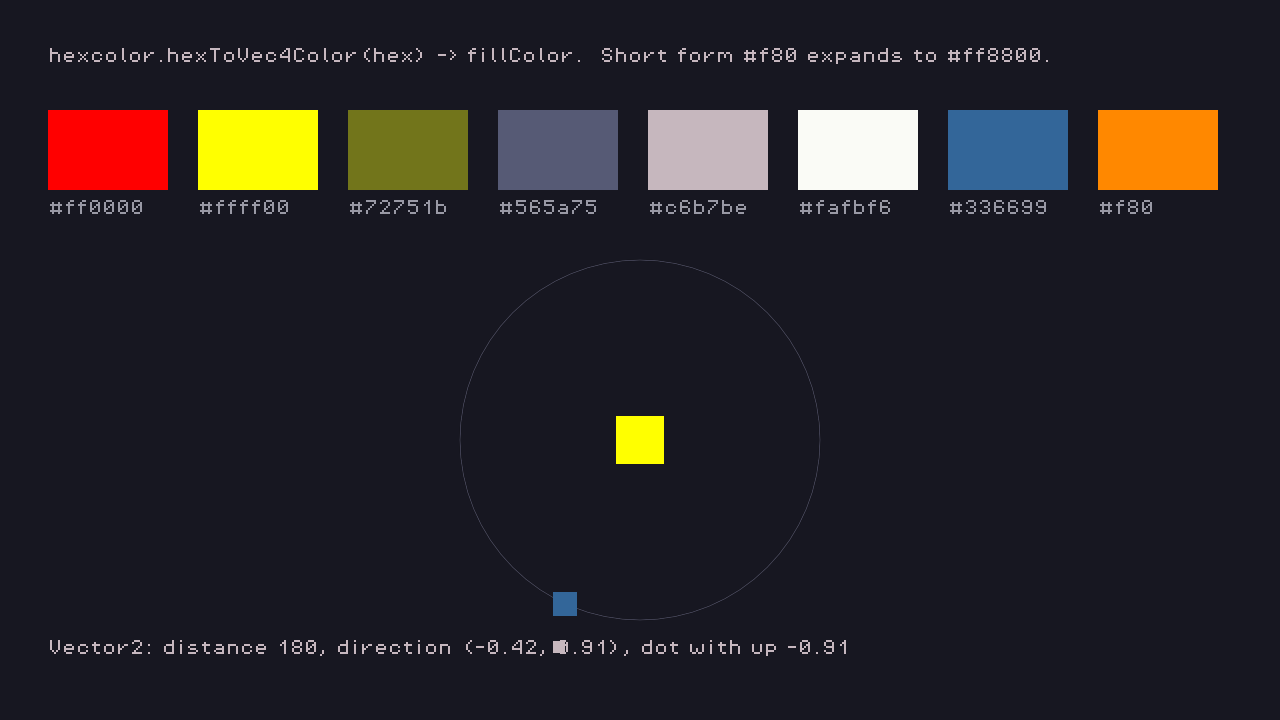
hexcolor turns "#rrggbb" strings into colour tables or Vector4s; Vector2 does the maths for an orbit.
- hexcolor
- Vector2
- Vector4
Source
examples/utils/hexcolor-and-vectors.lua · 79 lines · Open on GitHub
-- title: Hex colours and vectors
-- description: hexcolor turns "#rrggbb" strings into colour tables or Vector4s; Vector2 does the maths for an orbit.
-- order: 3
-- tags: hexcolor, Vector2, Vector4
local Scene = require "engine.Scene"
local GameObject = require "engine.GameObject"
local Vector2 = require "engine.Vector2"
local Vector4 = require "engine.Vector4"
local cacheManager = require "engine.cacheManager"
local hexcolor = require "engine.utils.hexcolor"

local SWATCHES = { "#ff0000", "#ffff00", "#72751b", "#565a75", "#c6b7be", "#fafbf6", "#336699", "#f80" }
local CENTRE = Vector2(640, 440)

---@class UtilsHexVectors : Scene
local Example = Scene.extend(Scene)

function Example:new()
  Example.super.new(self, "utils/hexcolor-and-vectors")
  self.backgroundColor = { 0.09, 0.09, 0.13, 1 }
  self.angle = 0
end

function Example:load()
  for i, hex in ipairs(SWATCHES) do
    local swatch = self:addGameObject(GameObject("swatch" .. i, Vector2(48 + (i - 1) * 150, 110), 120, 80))
    swatch.fillColor = hexcolor.hexToVec4Color(hex) -- Vector4(r, g, b, 1) in 0..1
    local label = self:addGameObject(GameObject("label" .. i, Vector2(48 + (i - 1) * 150, 200), 120, 24))
    label.text = hex
    label.textColor = Vector4(0.6, 0.6, 0.65, 1)
    label.font = cacheManager.getFont("body")
  end
  self.sun = self:addGameObject(GameObject("sun", Vector2(CENTRE.x - 24, CENTRE.y - 24), 48, 48))
  self.sun.fillColor = hexcolor.hexToVec4Color("#ffff00")
  self.planet = self:addGameObject(GameObject("planet", Vector2(0, 0), 24, 24))
  self.planet.fillColor = hexcolor.hexToVec4Color("#336699")
  self.moon = self:addGameObject(GameObject("moon", Vector2(0, 0), 12, 12))
  self.moon.fillColor = hexcolor.hexToVec4Color("#c6b7be")
end

function Example:update(dt)
  self.angle = self.angle + dt
  -- Vector2 operations all return new vectors.
  local orbit = Vector2(math.cos(self.angle), math.sin(self.angle)):scale(180)
  local planetCentre = CENTRE:add(orbit)
  self.planet:setPos(planetCentre:subtract(Vector2(12, 12)))
  local moonOffset = Vector2(math.cos(self.angle * 4), math.sin(self.angle * 4)):scale(44)
  self.moon:setPos(planetCentre:add(moonOffset):subtract(Vector2(6, 6)))
  self.distance = planetCentre:distance(CENTRE)
  self.direction = planetCentre:subtract(CENTRE):normalize()
end

function Example:draw()
  love.graphics.setFont(cacheManager.getFont("body"))
  love.graphics.setColor(0.78, 0.72, 0.75, 1)
  love.graphics.print("hexcolor.hexToVec4Color(hex) -> fillColor.  Short form #f80 expands to #ff8800.", 48, 48)
  love.graphics.print(string.format("Vector2: distance %.0f, direction (%.2f, %.2f), dot with up %.2f",
    self.distance or 0, self.direction and self.direction.x or 0, self.direction and self.direction.y or 0,
    self.direction and self.direction:dot(Vector2(0, -1)) or 0), 48, 640)
  love.graphics.setColor(0.25, 0.25, 0.32, 1)
  love.graphics.setLineWidth(1)
  love.graphics.circle("line", CENTRE.x, CENTRE.y, 180, 64)
  love.graphics.setColor(1, 1, 1, 1)
end

function Example.check(scene, ctx)
  if ctx.done then
    local red = hexcolor.hexToVec4Color("#ff0000")
    assert(red.x == 1 and red.y == 0 and red.z == 0 and red.w == 1, "hexToVec4Color")
    local ints = hexcolor.hexToIntegerColor("#336699")
    assert(ints[1] == 51 and ints[2] == 102 and ints[3] == 153, "hexToIntegerColor")
    local short = hexcolor.hexToIntegerColor("#f80")
    assert(short[1] == 255 and short[2] == 136 and short[3] == 0, "short form")
    assert(math.abs(scene.distance - 180) < 1e-6, "orbit radius")
    assert(math.abs(scene.direction:magnitude() - 1) < 1e-9, "normalised")
  end
end

return Example