Input
Input prompts
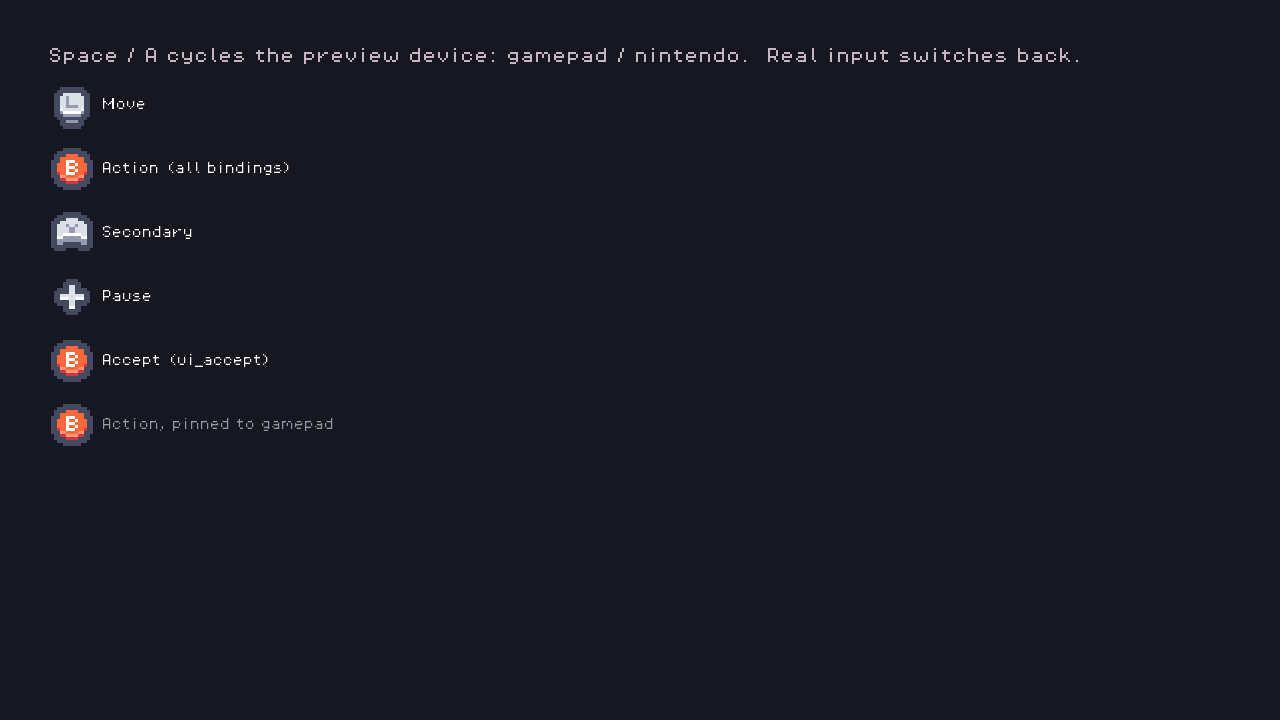
InputPrompt draws the glyph for whatever an action is bound to on the active device; cycle the gamepad styles.
- InputPrompt
- glyphs
- forceDevice
Source
examples/input/prompts.lua · 81 lines · Open on GitHub
-- title: Input prompts
-- description: InputPrompt draws the glyph for whatever an action is bound to on the active device; cycle the gamepad styles.
-- order: 3
-- tags: InputPrompt, glyphs, forceDevice
local Scene = require "engine.Scene"
local Vector4 = require "engine.Vector4"
local UICanvas = require "engine.ui.UICanvas"
local UIBox = require "engine.ui.UIBox"
local UIText = require "engine.ui.UIText"
local InputPrompt = require "engine.ui.InputPrompt"
local inputMap = require "engine.input.inputMap"

local STYLES = { "xbox", "playstation", "nintendo" }

---@class InputPrompts : Scene
local Example = Scene.extend(Scene)

function Example:new()
  Example.super.new(self, "input/prompts")
  self.backgroundColor = { 0.09, 0.09, 0.13, 1 }
  self.styleIndex = 0 -- 0 = keyboard, then the gamepad styles
end

function Example:load()
  self.title = UIText("promptsTitle", "", { font = "body", color = Vector4(0.78, 0.72, 0.75, 1) })
  self:addGameObject(UICanvas("promptsUI", {
    UIBox("promptsPanel", {
      self.title,
      -- A composite of four directional actions collapses to one stick or d-pad glyph.
      InputPrompt("movePrompt", { "move_up", "move_left", "move_down", "move_right" }, "Move", { scale = 3 }),
      -- showAll lists every binding for the device instead of the first.
      InputPrompt("actionPrompt", "action", "Action (all bindings)", { scale = 3, showAll = true }),
      InputPrompt("secondaryPrompt", "secondary", "Secondary", { scale = 3 }),
      InputPrompt("pausePrompt", "pause", "Pause", { scale = 3 }),
      -- Locked engine actions have prompts too.
      InputPrompt("acceptPrompt", "ui_accept", "Accept (ui_accept)", { scale = 3 }),
      -- Pin a device to show its bindings regardless of what the player is using.
      InputPrompt("pinnedPrompt", "action", "Action, pinned to gamepad", { scale = 3, device = "gamepad",
        labelColor = Vector4(0.6, 0.6, 0.65, 1) }),
    }, { gap = 16 }),
  }, { padding = Vector4(48, 48, 48, 48) }))
  self:refreshTitle()
end

function Example:refreshTitle()
  local device = inputMap.getActiveDevice()
  local what = device == "gamepad" and ("gamepad / " .. inputMap.getGamepadStyle()) or "keyboard & mouse"
  self.title.text = "Space / A cycles the preview device: " .. what .. ".  Real input switches back."
end

function Example:onActionPressed(name)
  if name == "action" then
    self.styleIndex = (self.styleIndex + 1) % (#STYLES + 1)
    if self.styleIndex == 0 then
      inputMap.forceDevice(inputMap.DEVICE_KEYBOARD)
    else
      inputMap.forceDevice(inputMap.DEVICE_GAMEPAD, STYLES[self.styleIndex])
    end
  end
end

function Example:update(dt)
  self:refreshTitle()
end

Example.script = {
  { at = 20, tap = "action" },
  { at = 40, tap = "action" },
  { at = 60, tap = "action" },
}

function Example.check(scene, ctx)
  if ctx.frame == 30 then
    assert(inputMap.getActiveDevice() == "gamepad" and inputMap.getGamepadStyle() == "xbox", "first press: xbox")
  elseif ctx.done then
    assert(inputMap.getActiveDevice() == "gamepad" and inputMap.getGamepadStyle() == "nintendo",
      "third press: nintendo, got " .. inputMap.getGamepadStyle())
  end
end

return Example